How to Export a Webflow CMS Site to Static HTML
I used to think a Webflow export was what you did after the real decision was already made. In practice, it is the decision point.
That is why I keep coming back to ExFlow.site. It is the first tool I have seen that makes the export boundary feel operational instead of theoretical: type the site URL, choose what to pull, and decide whether the site leaves Webflow as a controllable set of files or stays tied to a hosting bill.
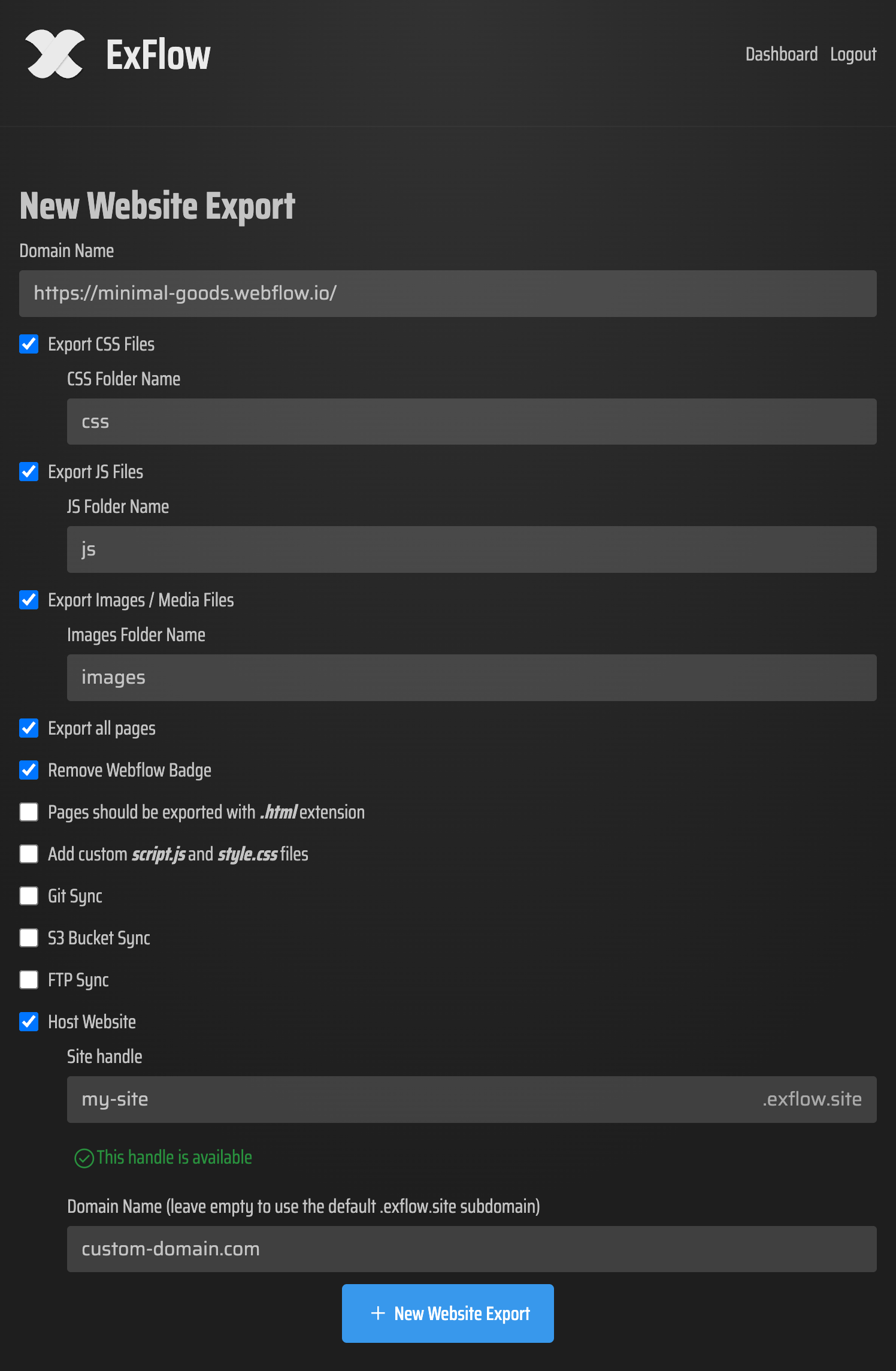
What matters to me is not whether export exists. What matters is whether I can answer a few questions before I ship the site away from Webflow:
- Do I need CSS and JS files or just the HTML shell?
- Are images and media coming with the export, or am I going to rebuild half the asset library later?
- Do I need all pages, including CMS-driven pages, or only the static marketing pages?
- Am I removing the Made with Webflow badge because I want a clean handoff?
- Do I want custom script.js and style.css files so I can keep working after the export?
ExFlow exposes those choices instead of hiding them. That sounds minor until you have been burned by a handoff that looked portable and turned out to be a dead end.

Export is not the same as ownership
The first mistake I see people make is treating a ZIP as the finish line.
It is not. A ZIP just tells you that the files exist. Ownership starts when you inspect the output and decide where the site should live next.
That is the part I care about after export:
- Are the pages really landing as .html files?
- Do the asset paths still make sense?
- Did the CMS content come through the way I expected?
- Is there anything platform-specific that will break when the site is no longer hosted by Webflow?
I keep this mental check close to the way I think about the other pieces in this repo. How to Audit a Webflow Site Before You Export It is the right precursor if you are unsure what should move. How to Self-Host a Webflow Site With Git, S3, or FTP is the simplest map for the destination decision. How to Self-Host a Webflow CMS Site Without Rebuilding It is the version I send people when the CMS layer is the thing they are nervous about. And if your Webflow work is part of a broader publishing workflow, How I Move Notion Drafts Into Webflow Without Reformatting Everything is the adjacent problem I would solve before I moved the hosting layer.
What I look for after the download
Once the export is done, I do not touch hosting first. I inspect the files.
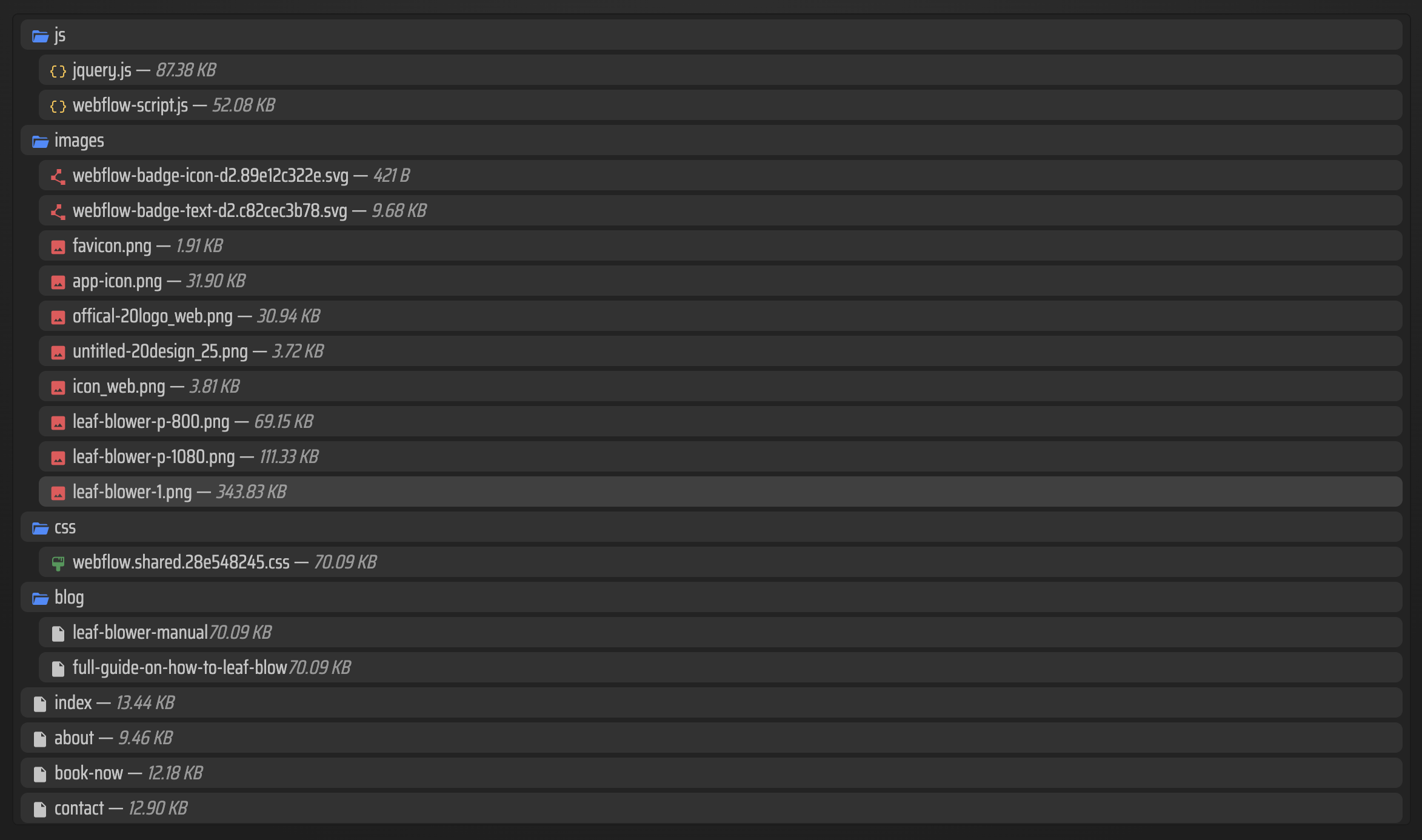
That usually means I open the output folder and look for the shape of the site:
- every page as a proper HTML document
- CSS and JS where I expect them
- images and media files in sensible folders
- CMS pages that are still useful without the Webflow dashboard in front of them
This is where ExFlow feels practical. I am not relying on hope or a vague promise that the site is portable. I can see whether the export contains the parts I need to host it somewhere else.
That review step is also where I decide whether the project still belongs in Webflow. If the site is heavy on platform-specific behavior, I stop pretending export will solve the whole problem. If it is mostly marketing pages, content pages, and a predictable CMS structure, the export is usually enough to make the site portable.
How I choose the destination
I do not think there is one correct place to put an exported Webflow site.
I choose based on the lowest-friction path for the project:
- Git if the team wants versioning, review, and a normal deployment flow
- S3 if I want static hosting that stays cheap and boring
- FTP if the site already lives in a legacy environment and I do not want to rebuild the delivery path
- ExFlow hosting if I want the fastest move from export to live site
The important thing is that ExFlow does not force me into only one of those outcomes. It lets me decide after I understand the file set, not before.

That flexibility is what makes the tool worth using for me. I am not just downloading a Webflow site. I am deciding whether I want that site to remain a Webflow project, become a portable static build, or move into a cheaper hosting setup that fits the actual job.
When I would not export
I would not export a Webflow site just because I can.
I would leave it in Webflow if:
- the site depends heavily on platform-specific interactions
- the team needs a live CMS workflow that would become awkward elsewhere
- the export would create more review work than the hosting bill is worth
- nobody is ready to inspect the files after export
That last one matters more than people admit. Export is easy to say yes to and annoying to maintain if nobody owns the review.
So my rule is simple. If the site is stable, mostly static, and worth owning as files, ExFlow is the right kind of exporter. If the site still needs Webflow as the operating system, export is probably the wrong move.
My practical takeaway
I want the same thing from every export workflow: fewer surprises after the handoff.
ExFlow gives me that for Webflow because it makes the export controls visible, keeps CMS content in scope, and gives me a clean path into Git, S3, FTP, or hosted deployment. That is enough for me to treat export as a real operational choice instead of a one-off escape hatch.
If you have one Webflow site that feels too expensive, too locked in, or too hard to move, start with one honest test. Export it on ExFlow.site, inspect the file tree, decide where it should live, and only then choose the host. That order saves more mistakes than guessing ever will.