How I Sync Etsy Listings to Instagram and Facebook Shops Without Manual Uploads
I used to treat social commerce sync as a one-time setup task. It is not. If you are running an Etsy shop, the real cost is not the setup screen, it is the repeated manual work of keeping product data current across channels.
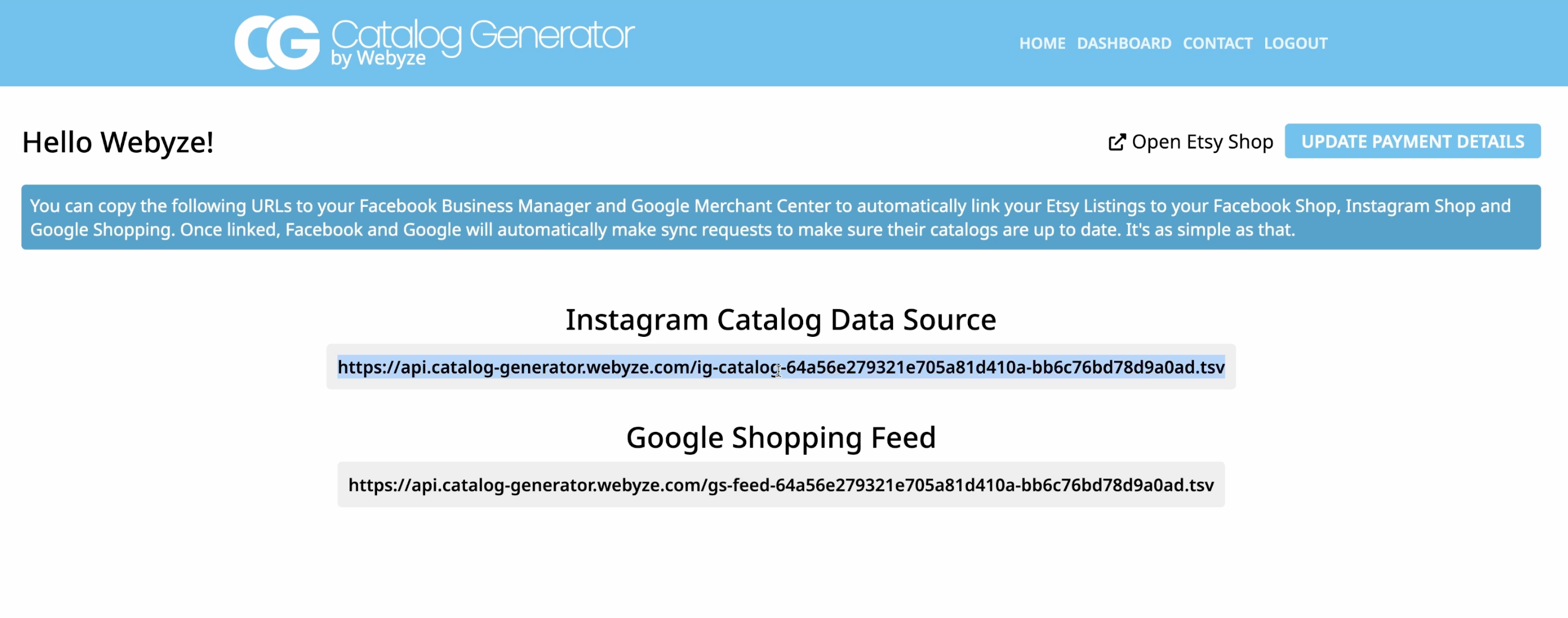
That is why I like the idea behind Catalog Generator for Etsy: it gives you a data-feed URL you can plug into Meta so your Etsy listings can stay synced into Facebook Shop and Instagram Shop without constant hand maintenance. For a small shop, that matters more than another shiny marketing feature.
The basic workflow is simple:
- Verify your domain in Meta Business.
- Create a catalog data source.
- Use the Catalog Generator feed URL instead of a manual file upload.
- Let Meta resync on a schedule.
If you want the short version, that is the whole game. The value is not complexity. The value is removing repeat work.
Why I would use this instead of manual uploads
Manual catalog uploads are fine when you have five products and never change them. Etsy shops rarely stay that still. Prices change. Variants change. Listings get added, paused, or rewritten. If you are also tagging products in Instagram posts, stale data becomes a real operational problem.
A feed-based setup solves the part I actually care about:
- New listings can appear without rebuilding a file.
- Updates are pulled into Meta on a schedule.
- You are less likely to forget a product when you launch something new.
- The same source of truth can support Instagram Shop, Facebook Shop, and Google Shopping use cases.
Catalog Generator for Etsy is built around that feed model. The app gives you a URL you can use as your catalog data source, which is much easier to maintain than exporting and re-uploading inventory files every week.
What you need before you start
Before I would touch Commerce Manager, I would make sure these pieces are in place:
- A Facebook Business account
- Your Facebook page connected to your Instagram account
- A business-level Instagram account, not a personal one
- Access to your Etsy shop manager
- A verified domain for the shop URL you are using
The product setup instructions point you toward the Meta Business domain verification flow first. That is the right order. If the domain is not verified, you can waste time configuring the catalog only to hit a wall later.
Step 1: Verify the Etsy domain in Meta
Open Meta Business and go to business settings, then the Domains area under brand safety and suitability. Add the Etsy shop domain tied to your store.
For Etsy, that means using the shop URL domain that redirects to your store. Meta wants to know you control the domain before it lets you move forward.
Once Meta gives you a meta tag, copy it into the Facebook Shops settings inside Etsy’s shop manager and connect it there. Then return to Meta and verify.
That sequence matters because it keeps the domain ownership check tied to the store itself instead of turning into a guessing game later.
Step 2: Create the catalog data source
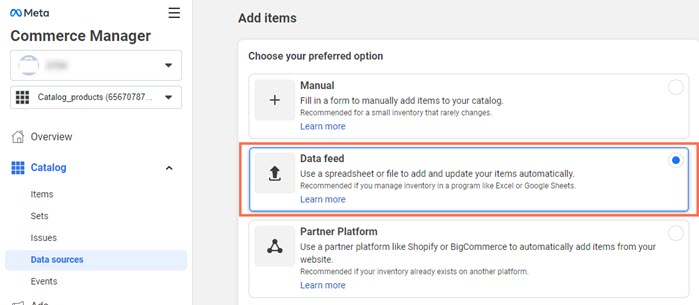
In Commerce Manager, go to your catalog and open the data sources panel. Choose to add items, then pick a data feed.
This is the point where most people overcomplicate the setup. You do not need a manual upload if your goal is ongoing sync. You want a URL feed.
That is exactly what Catalog Generator provides. It is designed to give you a feed URL you can paste into Meta so the listings are pulled in automatically.
Step 3: Paste the Catalog Generator feed URL
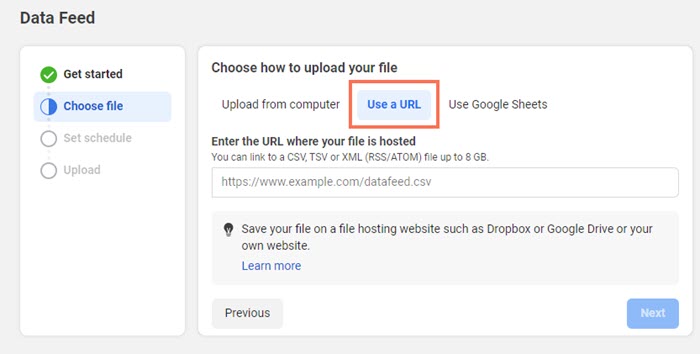
Log in to Catalog Generator, connect your Etsy shop, and copy the feed URL it gives you. Then paste that URL into Meta as your data source.
The point of this setup is that you are not managing a separate spreadsheet or CSV export just to keep your shop visible on social channels. Once the feed is in place, Meta can keep fetching from the same source.
That is a small thing on paper. In practice, it saves you from catalog drift, which is what happens when your storefront and your social catalog stop matching.
Step 4: Set a refresh schedule
When Meta asks how often it should fetch the catalog, I would choose a daily schedule unless you have a strong reason not to.
Daily refresh is usually enough for Etsy shops that change products regularly but do not need near-real-time inventory sync. If your catalog is larger or your product set changes constantly, you can revisit the cadence later.
What I would not do is leave the feed on a schedule you never check again. The whole advantage of automation is that it is predictable. You still need to review it occasionally.
Step 5: Submit the domain for approval
After the feed is running, go back into the catalog settings and submit the domain for approval. That is the step that lets you actually tag products and use the shop more broadly across Meta surfaces.
If you skip this part, you can end up with a catalog that technically exists but does not do the work you wanted it to do.
Where this fits in a real shop workflow
I like tools like this when they replace recurring admin, not when they add another dashboard to babysit.
For an Etsy seller, the practical win is straightforward:
- List on Etsy once.
- Push the feed into Meta once.
- Keep product tags and shop surfaces in sync.
- Spend time on listings, creative, and traffic instead of file management.
If you are already thinking about your broader listing workflow, this pairs well with other operational cleanup. I would look at How to Bulk Edit Etsy Listings Without Breaking Variations if your product catalog also needs cleanup before you start syncing it outward.
Pricing and trial
Catalog Generator for Etsy is listed at $5 per month, and it includes a 7-day free trial.
That is low enough that I would treat it as a workflow tool rather than a major software commitment. If it saves you from one bad manual catalog update, it probably pays for itself quickly.
Final check before you publish
Before you consider the setup done, I would verify these things:
- The Etsy domain is verified in Meta
- The feed URL is loading correctly
- The catalog is pulling in the right listings
- The refresh schedule is active
- The domain approval has been submitted
If all five are in place, you have a setup that is much easier to maintain than a manual upload loop.
Conclusion
If your Etsy shop is starting to depend on Instagram and Facebook traffic, Catalog Generator for Etsy gives you a cleaner way to keep your listings in sync without repetitive uploads. I would use it when I want the social catalog to stay aligned with Etsy and I do not want another manual export to manage.
Start with domain verification, connect the feed, and let the automation do the boring part.