Download A Framer Site To HTML With Assets In Minutes
If you love designing in Framer but want the freedom to host anywhere (or simply reduce monthly costs), you can export your project to static HTML, CSS, JS, and images—fast. In this guide, you’ll learn the quickest, most reliable way to download a Framer site to HTML with all assets using ExFlow, a dedicated Framer Exporter and Framer Downloader.

Why download your Framer site to HTML?
- Self-host a Framer site on your own server or CDN.
- Cut recurring costs if you find Framer too expensive for your needs.
- Gain control over performance, caching, and deployment workflows.
- Preserve a snapshot of your site with versioning in Git.
Meet ExFlow: The fastest Framer to HTML workflow
ExFlow is a purpose-built exporter that downloads your site (including all pages, CSS/JS, and images) and gives you a ready-to-deploy static package. It’s ideal when you want to:
- Download Framer site code and assets without manual scraping.
- Remove "Made with" badges for a clean, branded look (ensure compliance with terms for your use case).
- Export all pages at once, including dynamic and multi-page structures.
- Add custom script.js and style.css files automatically.
- Sync your export directly to Git, S3, or via FTP.
- Host your static site on ExFlow with optional custom domains and unlimited bandwidth.
Note: Only export and self-host sites you own or have the legal right to copy. Always respect platform terms and licenses.
How to download a Framer site to HTML with assets (in minutes)
- Open ExFlow
- Go to ExFlow.site and paste your Framer site’s URL.
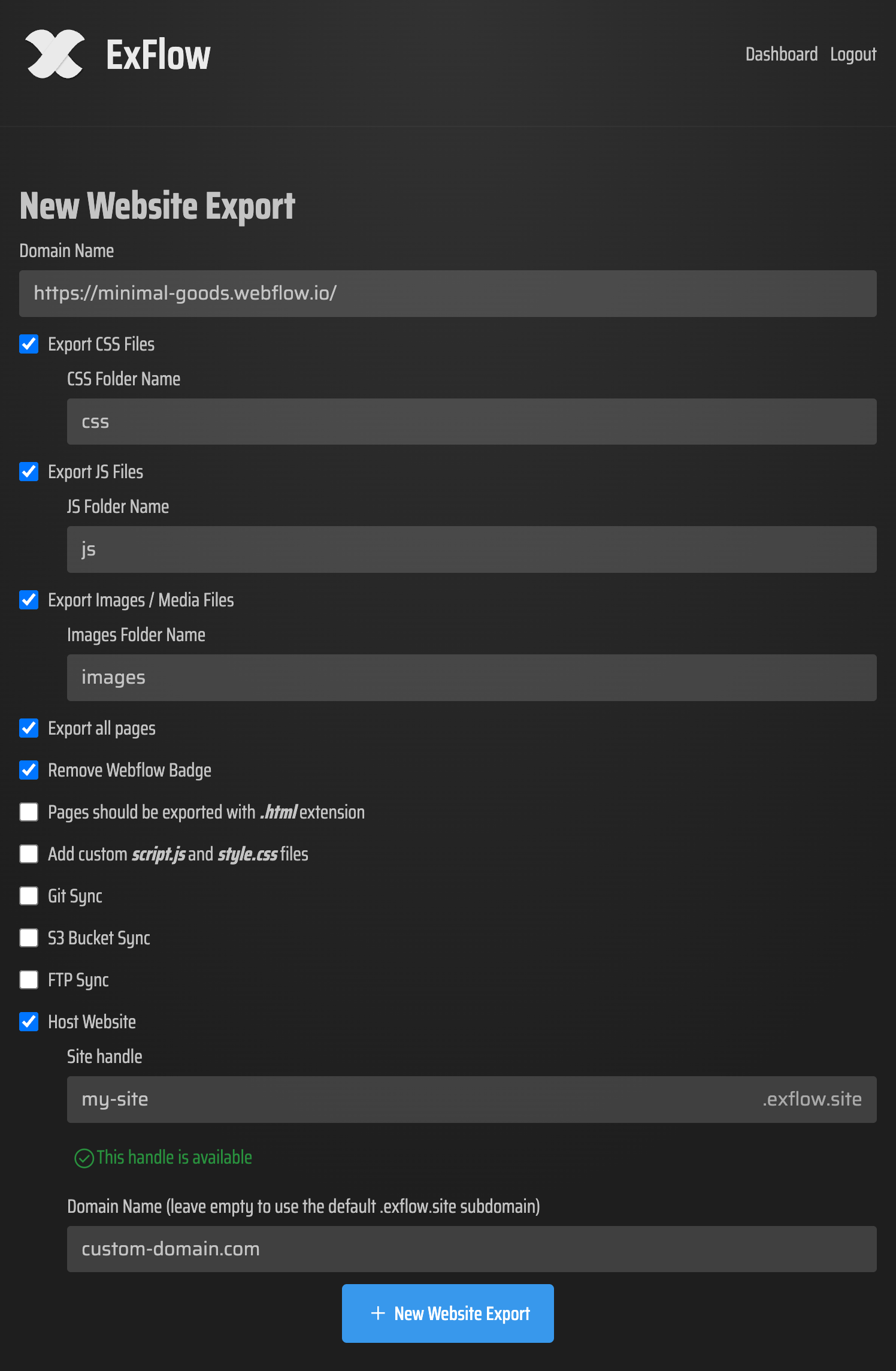
- Choose export options
- Export CSS files: Bundle all styles.
- Export JS files: Include interactive behavior.
- Export images/media: Pull images, videos, and other assets.
- Export all pages: Grab every page in your project.
- Remove "Made with" badge: Optional, for clean branding.
- Add custom script.js and style.css: Perfect for small tweaks after export.
- Pages as .html: Ensures your output is deploy-ready.
- Optional sync: One-click sync to Git, S3, or FTP for instant deployment.
- Start the export
- Click to begin. ExFlow crawls your site and compiles a clean static package.
- When complete, download the ZIP or let ExFlow auto-sync to your host.
- Verify the bundle locally
- Unzip the export. Double-click index.html to open it in your browser.
- Test navigation, images, animations, and forms.
- Adjust base paths if needed (rare) and add your analytics, SEO tags, or scripts.
What exactly do you get?
- A neat static site folder with .html pages.
- Asset directories for CSS, JS, and images/media.
- Optional custom script.js and style.css files added to every page.
- Cleaned markup (badge removed if selected), ideal for client handoff or white-labeling.
Deploy your exported Framer site (hosting options)
You can deploy your static output almost anywhere. ExFlow makes this especially easy:
- Host on ExFlow
- Amazon S3 (static website hosting)
- Git-based workflows (GitHub Pages, Netlify, Vercel)
- Traditional servers via FTP
Helpful video resource
- How to Export a Webflow Site For Free (concept applies similarly to static deployments): https://www.youtube.com/watch?v=QFuDqtk09qs
Pro tips for a flawless Framer-to-HTML handoff
- SEO hygiene
- Performance wins
- Forms and integrations
- Accessibility and QA
- Version control
When is exporting the right move?
- You want a Framer Alternative for hosting
- Cost control
- Enterprise or compliance needs
- Speed and reliability
FAQs: Framer to HTML, answered
- Does this export all pages?
- Will my animations and interactions work?
- Can I remove the "Made with" badge?
- Can I host on ExFlow?
- Is it safe to connect Git/S3/FTP?
Get started now
If you’re ready to download a Framer site to HTML with assets and deploy in minutes, try ExFlow. It’s the fastest path from Framer to HTML, with extras like Git/S3/FTP sync, badge removal, all-pages export, and turnkey hosting.
- Try the Framer Exporter and Framer Downloader: https://exflow.site
- Prefer one-click publishing? Host your exported site on ExFlow: https://exflow.site
Take control of your stack, cut unnecessary costs, and ship a lightning-fast, self-hosted Framer site today with ExFlow.